
Wait, don't go!
Before you leave, we have a special offer just for you!
Get 20% off your next purchase.
Before you leave, we have a special offer just for you!
Get 20% off your next purchase.
PRACTICAL GUIDE TO CLIENT WORK
Scope creep rarely looks dramatic when it begins.
The problem is not that a client asked for something.
The problem begins when the request changes the agreed work but the project continues as though nothing changed.
The examples below show common ways that happens in freelance website projects — what changed, why the request may be outside scope, and what to check before you automatically say yes.
Written by Renan Corbes
Last reviewed
The scenarios on this page are illustrative composites based on recurring patterns in client website work. They are not presented as individual client case studies.
A new request is not automatically scope creep.
PMI defines scope creep as the uncontrolled expansion of project scope without corresponding adjustments to time, cost, or resources. (Project Management Institute)
For freelance work, a useful test is:
Did the work change without the agreement changing with it?
If the client requests another page, you quote it, adjust the schedule, get approval, and then build it, that is a managed project change.
If the additional page quietly gets absorbed into the existing price and timeline, that is where scope creep begins.
The important pattern is not the wording of the request. It is the difference between what was agreed and what is now being asked for.
A page is not merely a page. It may involve layout, content integration, responsive work, navigation changes, SEO setup, testing, approval, and revisions.
A new feature can affect several parts of the project.
A change that sounds tiny in an email can therefore be a genuine change in scope.
Here are four common patterns:
The project includes a homepage, About page, Contact page, and five service pages.
During the build, the client decides another service deserves its own page.
At first glance, it sounds minor: “It can look similar to the other service pages.”
But a new page can still require content preparation, layout work, responsive implementation, navigation changes, internal linking, SEO setup, testing, client review, and revisions.
What changed
The project now has another deliverable. That is different from revising one of the pages already included.
Boundary check
Was this page included in the agreed page list? If not, it is additional work even if the design can reuse an existing structure.
A client originally needs a brochure-style website.
Partway through the project, they decide they also want a blog.
That can sound like: “WordPress already has blogging, so can we just turn it on?”
But a blog may involve blog archive design, single-post templates, categories, author/date treatment, navigation changes, sample content, responsive styling, SEO settings, and testing.
What changed
The project gained a new content system and new page templates.
Boundary check
The fact that WordPress supports posts does not mean designing and configuring the blog was automatically included in the original website scope.
Not every scope change adds a new page.
Sometimes the quantity inside an existing deliverable changes.
A service page planned around four services becomes twelve. A simple team section becomes profiles for twenty staff members. Or the client supplies several times more copy than the layout was designed around.
What changed
The volume and structure of the work changed. That can affect layout, page length, components, responsive behavior, content entry, testing, and navigation.
Boundary check
Do not ask only, “Is this still the same page?” Ask: “Does the actual amount of work still match what this page was scoped to contain?”
The original project includes a contact form.
Later, the client asks for submissions to be sent into a CRM or another external platform.
The visible difference may be tiny. The visitor still sees a form. But behind the interface, the work may now involve account access, API or native integration setup, field mapping, authentication, testing, error handling, vendor limitations, and troubleshooting.
What changed
A standard form became an integration project.
Boundary check
If the original scope said “contact form,” that does not automatically mean contact form + CRM integration + automation workflow. Clarify the actual requirement before assuming the new functionality is included.
A simple inquiry form can quietly grow.
The original requirement might be name, email, phone number, and message.
Then the project gains conditional fields, multiple recipients, file uploads, calculations, different confirmation messages, routing based on answers, or autoresponders.
No individual request sounds enormous. Together, they can turn a basic form into a small application.
What changed
The complexity of the feature, not necessarily the number of features.
Boundary check
The deliverable can retain the same name while the work behind it changes substantially.
The client discovers a scheduling tool, membership plugin, review widget, chat system, analytics product, or another third-party service.
The request may sound like: “We already bought it. Can you just add it?”
Installing software may take seconds. Configuring it properly may involve settings, design integration, testing, account configuration, conflicts, documentation, and troubleshooting.
What changed
A new third-party system was introduced into the project.
Boundary check
Check whether the original scope included installation only, configuration, styling, integration, troubleshooting, or ongoing support. Those are different levels of work.
The project includes two revision rounds. Both have already been used.
The client then sends: “Everything looks great. We just have a few final tweaks.”
This is one of the easiest scope changes to absorb because the work already exists and the relationship is usually positive.
What changed
The agreed revision process has been exceeded.
Boundary check
Check how many rounds were agreed, whether the current round is already complete, and whether these are genuine revisions or a new direction.
A client approves a visual direction. Development begins.
Then the client asks to reconsider the page structure, design style, typography, layout concept, visual hierarchy, or overall direction.
That is different from: “Can we make this heading smaller?”
What changed
Previously approved work is being reopened or replaced. A normal revision improves an agreed direction. A redesign changes the direction itself.
Boundary check
Ask: “Are we refining what was approved, or are we replacing it?” That distinction is often more useful than simply counting revision requests.
The project has one main decision-maker. Several stages are approved.
Then another owner, executive, manager, spouse, department, or stakeholder enters the project and provides a new set of feedback.
Their feedback may be completely reasonable. But it may contradict earlier approvals.
What changed
The approval structure changed after work had already progressed.
Boundary check
Who has final approval authority? Was this stakeholder meant to review earlier? Does their feedback revise current work or reopen completed work?
The project assumes the client will provide finished copy and images.
Instead, the designer receives rough notes, unorganized files, partial copy, mismatched image sizes, content spread across emails, or missing page information.
Then comes: “Can you just clean this up and put it on the site?”
What changed
Responsibility for content preparation or content production moved from the client to the freelancer.
Boundary check
Check what the original agreement says about who supplies content, whether content must be final, who edits it, who enters it, and who prepares images.
The website has been approved and launched.
A few days later, the client notices something they would like to add or change.
Nothing is necessarily wrong with the delivered site. They simply have new requests now that they are using it.
What changed
The project may have moved from delivery into post-launch support.
Boundary check
Is this fixing something that was delivered incorrectly, or is this a new request after delivery? Those are very different situations.
Sometimes scope creep does not appear during the build at all. It appears after handoff.
The client begins sending text changes, new photos, staff updates, new services, plugin questions, troubleshooting requests, or “quick” website edits.
One request may be trivial. Months of requests are not.
What changed
A one-time website project gradually became ongoing support or maintenance.
Boundary check
Ask whether ongoing support was included after launch. If not, the relationship may need hourly support, a maintenance arrangement, a separate task quote, or another clearly defined system.
These twelve situations look different. Some involve pages. Some involve features. Some involve revisions. Some involve responsibility. Some happen after launch.
But the underlying pattern is the same:
1. There was a baseline
The project had an agreed set of deliverables, responsibilities, approvals, or boundaries.
2. Something changed
A new request increased or altered the work.
3. The change was easy to minimize
It sounded like one more page, one quick integration, a few tweaks, or one final revision.
4. The project had to decide what happens next
This is the point where additional work either becomes a managed change or quietly becomes scope creep.
It is important not to label every inconvenient request as scope creep.
Fixing work that does not meet the agreed requirement
If the agreed deliverable is broken, incomplete, or implemented incorrectly, correcting it is usually part of delivering the original scope.
A normal revision within the agreed process
If two revision rounds were included and the client is using revision round one, the project is working as expected.
Additional work that has been properly approved
The client can request ten additional pages if they want. If the extra work is identified, priced, scheduled, and approved, the project scope changed, but the change is being managed.
The goal is not to prevent change. The goal is to make change visible.
When you receive a request that feels like it may be outside scope, compare it to the original agreement.
You do not need to become defensive every time the answer is yes. You simply need to stop long enough to decide deliberately.
Recognizing the pattern is the first step.
Handling it is a separate skill.
A practical response usually involves:
Review the proposal, scope, page list, revision rules, responsibilities, or whichever document defined the job.
Be specific about the new deliverable, feature, revision, stakeholder, responsibility, or lifecycle change.
Does it add time, cost, functionality, another revision round, external costs, or a deadline change?
Choose whether to absorb, quote, or decline the request.
Leave a clear record so the same request is not remembered differently later.
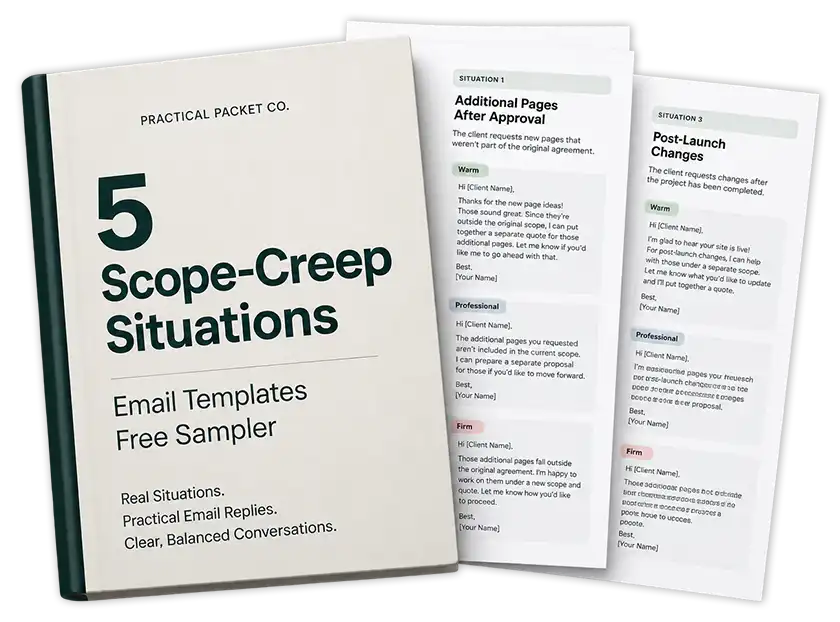
FREE RESOURCE
That is often the uncomfortable part.
The free 5 Scope-Creep Situations sampler gives you 15 ready-to-adapt replies for common out-of-scope client requests.
Each situation includes:
Warm
Professional
Firm response options.
Learn what scope creep means, why it happens, how to prevent it, and how managed project changes differ from uncontrolled expansion.
Work through what to do when a client request falls outside the original agreement.
Get 15 ready-to-adapt responses for common out-of-scope requests.
A simple example is a website project that includes five pages. During development, the client asks for a sixth page but expects it to be included in the original price and deadline.
If the additional page is simply absorbed without re-scoping the project, that is scope creep.
No.
Adding another page is a change in scope. It becomes scope creep when that new work is informally absorbed without adjusting the agreement, price, timeline, or expectations where appropriate.
It depends on the agreed revision process.
If the revision is within the number and type of revisions included in the project, it is part of the scope. If the included rounds are already complete, another round may be additional work.
It can be.
If functionality that was not part of the agreed project is added without formally adjusting the scope, the new feature contributes to scope creep. If it is quoted and approved as additional work, it is a managed change.
Feature creep is narrower.
It refers specifically to a product or project accumulating additional features. Feature creep can cause scope creep when those features increase the project work without corresponding changes to time, cost, resources, or expectations.
Not necessarily.
A deadline change affects the project schedule rather than automatically expanding the deliverables. However, asking for the same work significantly sooner can change the amount of effort, prioritization, or resources required. It should therefore be treated as a project change even when the deliverables remain the same.
PRACTICAL PACKET NO. 001
Recognizing an out-of-scope request is one problem.
Finding the right words to respond is another.
Packet 001 contains:

Renan Corbes is a web designer/developer with more than 15 years of experience working on client websites, including WordPress builds, redesigns, revisions, content collection, project handoffs, changing requirements, ongoing support, and the everyday communication problems that come with client work.